Showing posts with label Interesting Info. Show all posts

The Ultimate Guide to Using Maltego as a Powerful Footprinting Tool

Every pentester and hacker uses tools to make them more efficient at what they do.
That includes when conducting reconnaissance.
So by now you may or may not have heard of a tool called Maltego?
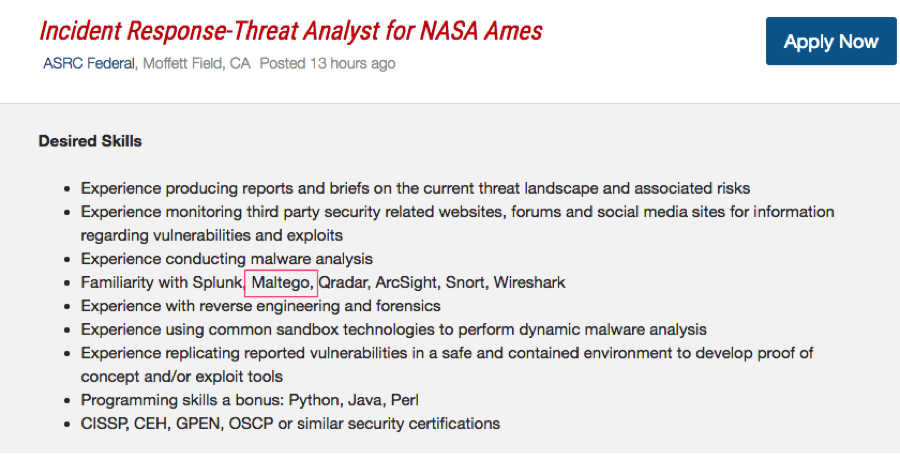
When I first heard about it, I was wondering why it was such a big deal in the IT Security and Pentesting community. If you look at many of the IT Security jobs available online you will eventually come across Maltego as one of those tools companies want you to have experience with.

maltegojob1 maltegojob2
That goes without saying that you are likely to run across it as a test question when taking many of the security certifications out there as well.
I want to show you how you can use this tool to improve your Footprinting technique. As humans we are very visual creatures. For instance seeing a location on a map is much easier to understand than looking at GPS coordinates. This is exactly what I think is the genius of Maltego.
Think of it like this, we are trying to find treasure on a treasure map but we need to start filling in the map and we need to pick a starting location.   Basically you start with one piece of information and use that piece to find the next section of the map, and then use that next section to find another and so on.
Do you remember when the huge insurance firm called Anthem was hacked and 80 million social security numbers were exposed?
Maltego was used by the security firm CrowdStrike to do research, create their own treasure map and find servers that were tied to the Chinese hacker group behind that hack.(See http://krebsonsecurity.com/2015/02/anthem-breach-may-have-started-in-april-2014/).
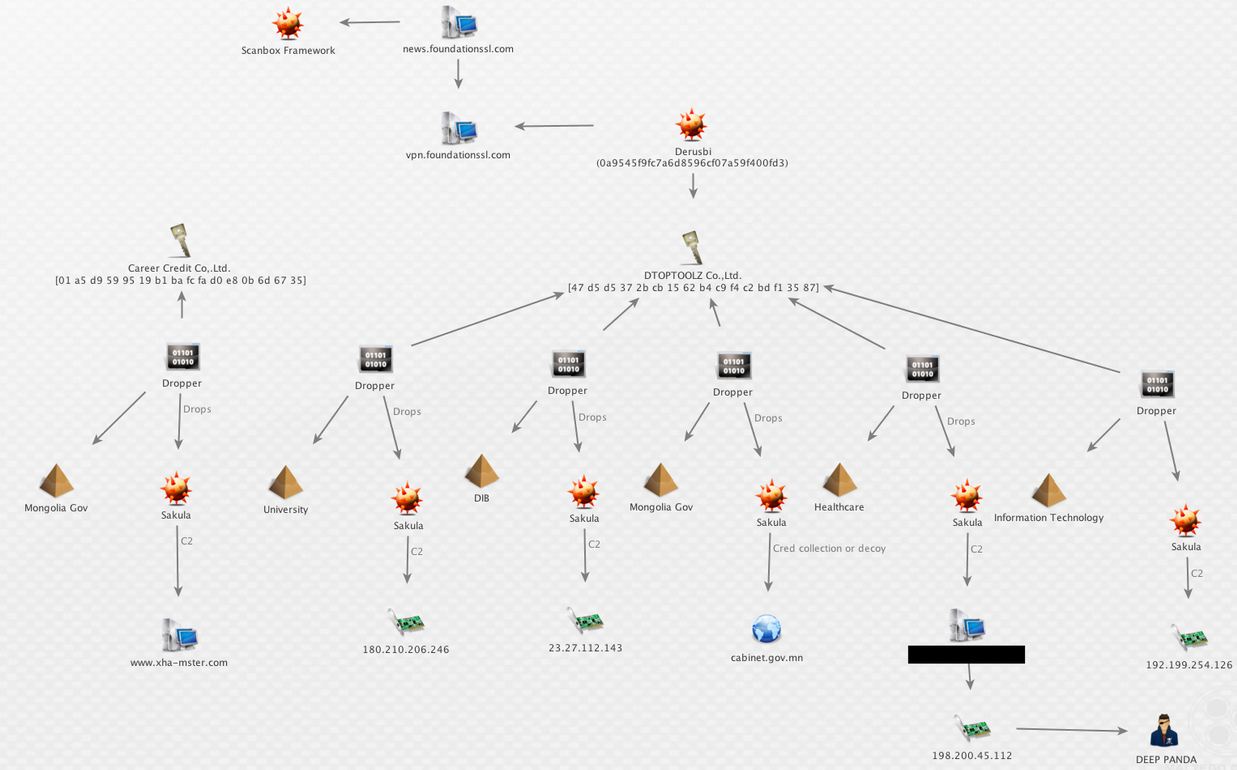
crowdstrike
Personally, I already had some experience information gathering/Footprinting and knew that I could do all of my reconnaissance without this tool. When I first opened it up I remember thinking that this seems like a really cumbersome way of trying to perform recon.
We will get into why I eventually came to see how powerful this tool really was but first lets just go over some basics on what it is.
Maltego in the simplest form is an information-gathering tool and a tool that will help you perform reconnaissance on your next target. By target I mean people, infrastructure, networks, servers, IP addresses and the list goes on and on. If there is information to find this tool can help you find it.
Maltego is basically a hub for a bunch of different scripts that help you perform different Footprinting actions called transforms. It then puts all that information together in a nice format that makes it easy for you to consume the information.
Maltego actually comes pre-installed on Kali Linux and if you don’t have it already you can install it rather quickly using a Kali Linux Virtual Box Setup (https://www.hackingloops.com/kali-linux-virtualbox-pentest-lab/).
So, enough talk lets take it for a test drive. To start Maltego in Kali Linux simply type “Maltego”.

maltegostart
You will see something that looks like the following graphic, and if you are booting for the first time it could take a couple of minutes:
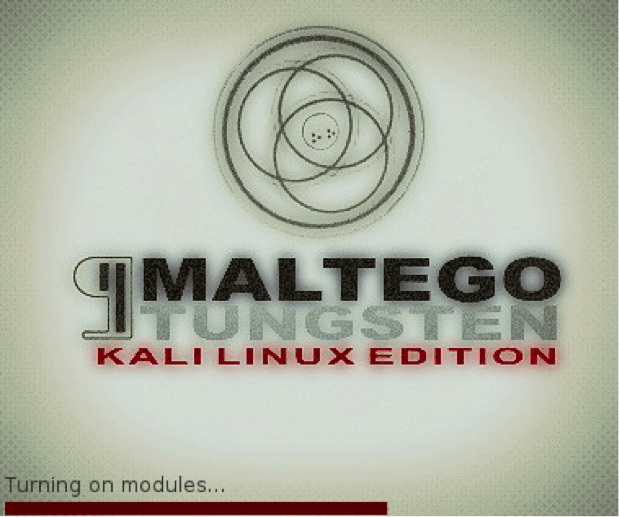
maltegomodules
When it finally boots you can see the setup and basic look of Maltego:
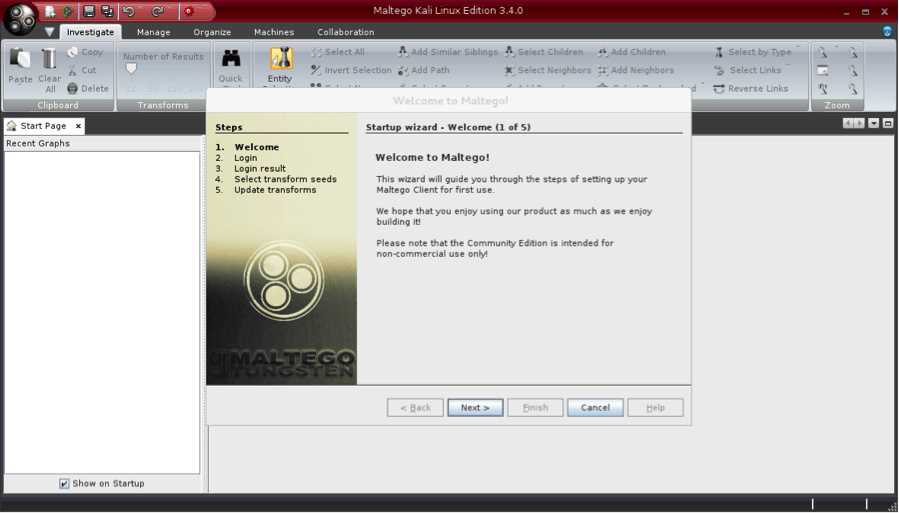
maltegostartup
From this setup screen just follow the steps by clicking next, create a login for yourself and then registering. The setup will guide you through all of that rather easily.
Once you’ve logged into the servers using the login you just created, you will see that “Maltego public servers” is checked. Just leave this checked, as these are the servers we want to discover transforms from and click next.
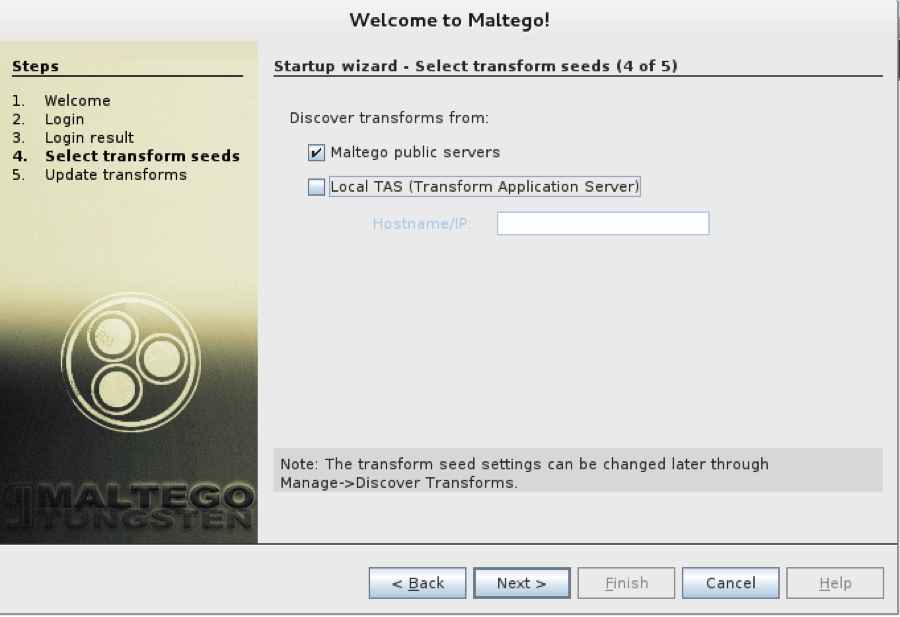
maltegowelcome
You will then see the following launch page that will finally let us get started. Just leave Run a machine (NEW!!) checked and click finish.
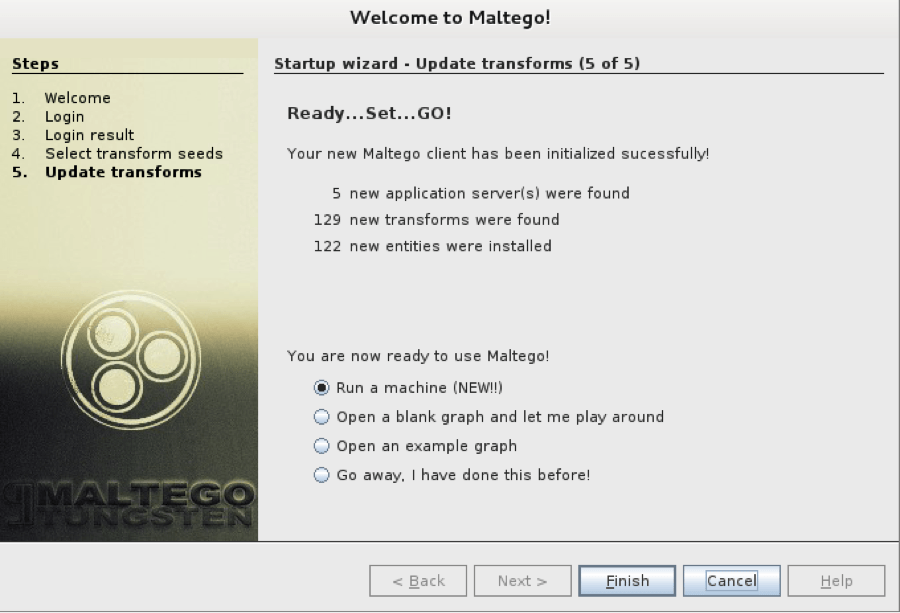
maltegorun
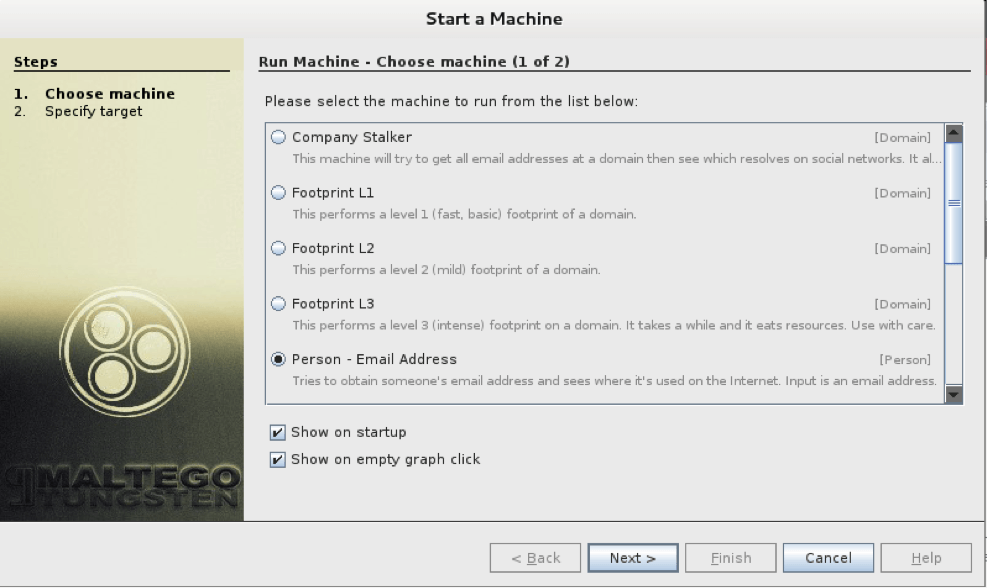
Ok, so now that is done it starts to get really interesting because on the next screen as you can see below, we are actually able to choose the type of reconnaissance we want to do now on our target. We have several options but lets just do a quick overview of some of the more important ones:
Company Stalker
This option basically allows us to select a particular domain, from that it searches for all the email addresses it can find and from there it tries to find all the social media networks it can find.
Footprint L1
  • This is a basic footprint of a domain in its simplest form.
Footprint L2
  • Same as above just a little more involved and will take a little longer. We might get a bit more data than the most basic Footprint above.
Footprint L3
  • Same as the other two above except much more involved. This can take a ton of time to complete but might also net us much more information in the end.
Person – Email Address
  • You input an email address and it sees what it can find using that out on the web.
URL To Network And Domain Information
  • You input a URL and you get back network information.
startamachine
For this next exercise lets just do the basic Footprint of an organization for now. It will be the quickest and let us see how the basic functionality works. Select Footprint L1 and click next.
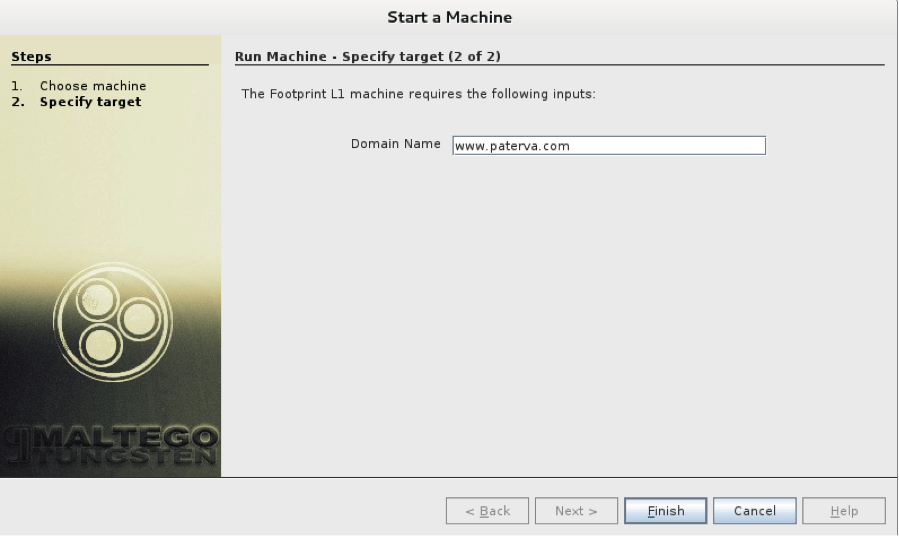
Lets do a Footprint on the company that created Maltego: www.paterva.com:
startamachine2
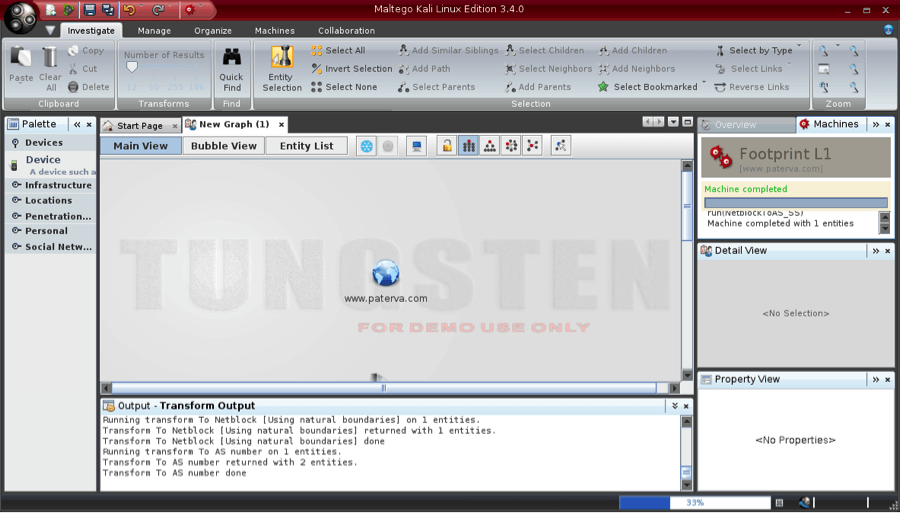
From there you just hit run and Maltego will automatically start Footprinting the domain for you. If you have ever done reconnaissance you know how amazing a tool like this is because it takes time to do the proper research on your target and generally speaking when conducting a pentest, the reconnaissance is the part that takes the longest.
reconnaissance
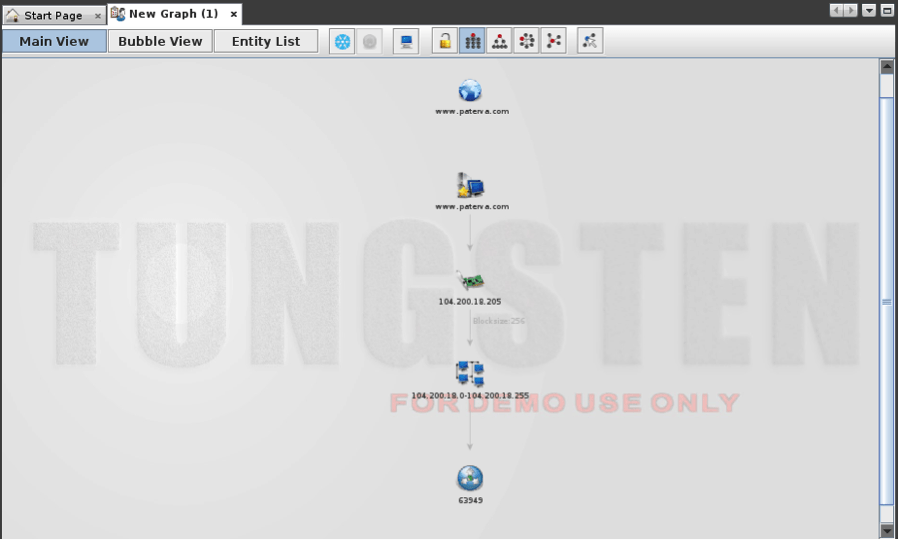
Just below our new graph it created, you might notice the Transform Output. This is output of the actual Footprint transform in action and gives us a look at what it is looking for. You might also notice the domain we typed in laid out in an easy to digest graph format. You also might notice if you zoom out of the graph a bit it will reveal some other entities besides the domain you typed in.
graphfull
Using the most basic Footprint starting with only the domain we were able to find the website, IP Address, Netblock and AS Number. Not a ton of information but much more than we had before and these pieces will help us find other crucial information on the treasure map that is our target.
So now that we know some basic functionality on how this works, lets try and use that to take our Footprinting further. You might have noticed in the graph that there looks to be several computers in a cluster with an IP Range below it. This is a netblock that the domain belongs to. So if we take a second to think about that, we could reasonably assume that there may be other systems on the same netblock that might be relevant to our initial target.
With that information we could simply right click the netblock and run the transform NetblocktoIPs:
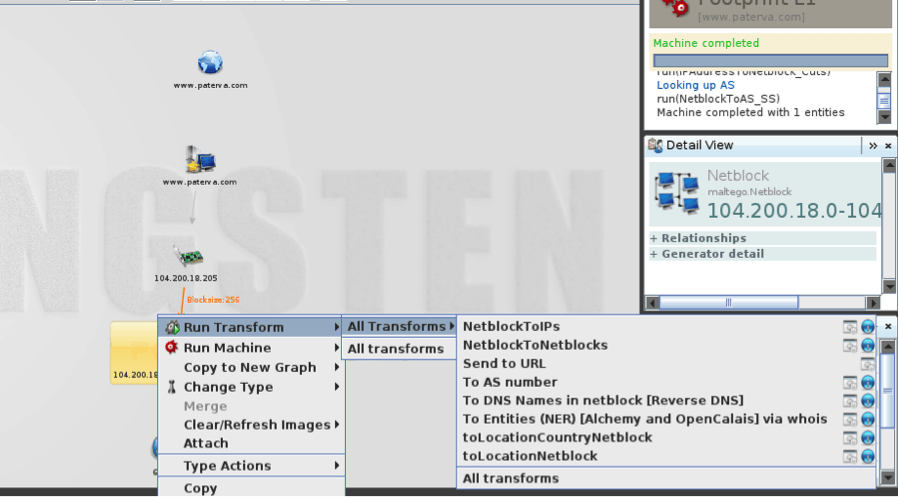
transform
That then gets us what we were looking for and we have found other machines within that netblock that might be relevant:
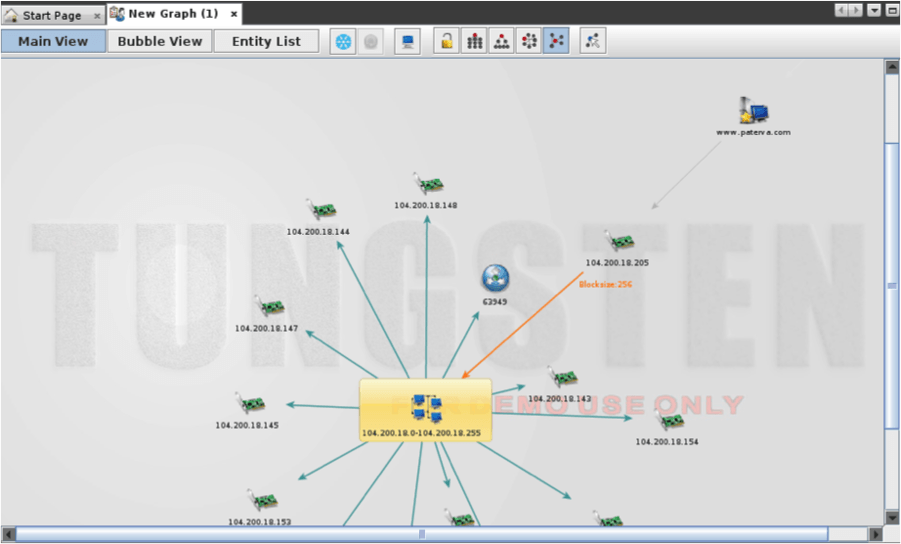
netblock
Chances are that some of these machines might belong to www.paterva.com. From there we could then run new transforms on each of these machines to produce an even more detailed map of our target. You can now see how powerful this tool is as you have the ability to keep running these transforms until you find what you need.
To get started from scratch and create a completely new transform you can click the “create a new graph” icon in the top left hand corner. You can then just right click anywhere on the new graph and you will be able to choose a starting point once again:
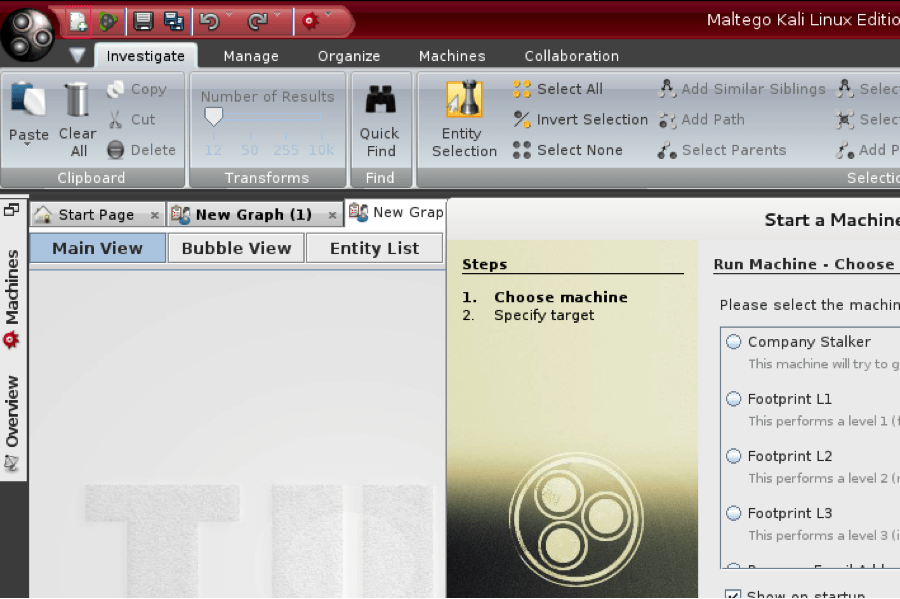
startingpoint
You can also use the main menu option, which is the large circular button (top left) to create a new graph, open an older one or save the current one as well.
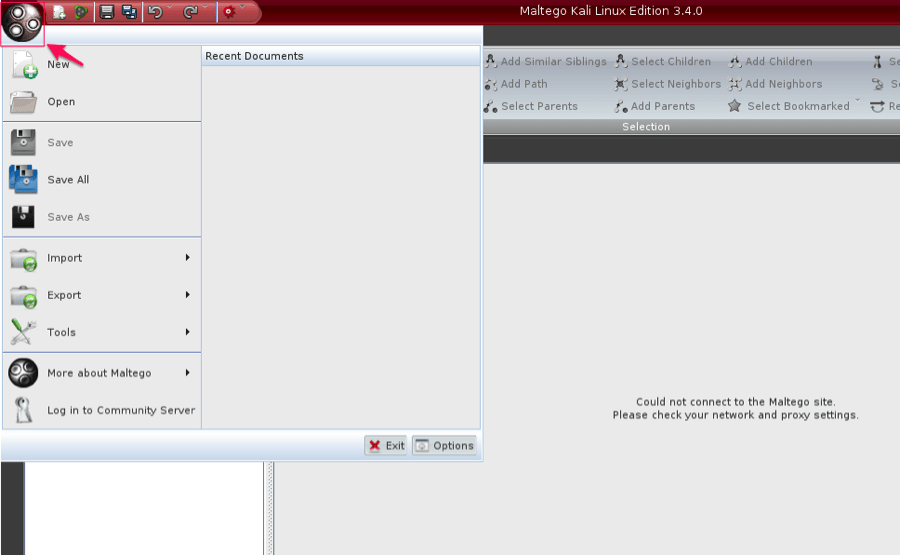
MaltegoButton
In the above tutorials we used default Footprinting transforms at the most basic levels for network intelligence gathering. There will be many other times where we need to be more specific in narrowing our search to one specific device, location or personal piece of information.
Lets say for this example that all we have is a mail server name and we need to use that as the starting point on our map because at this point it is all we have. We first need to find that particular item to place on our map. One way we can do that is by opening up the Palette menu box. You can get there by going to the Manage tab and then find the Palette options in the Windows section.
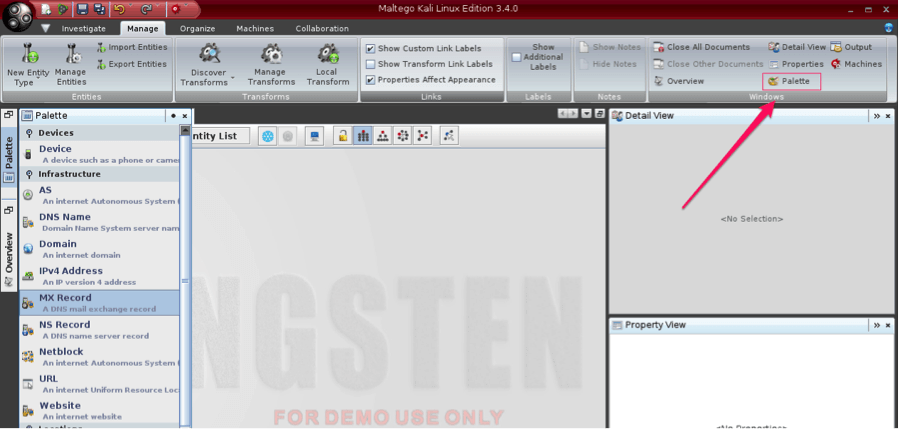
palette
We then can drag the MX Record item on to our graph. You will notice below that when you drag it over it uses the default MX Record of mail.paterva.com. We can change that though by double left clicking the item name and typing in the MX Record that we want to use.
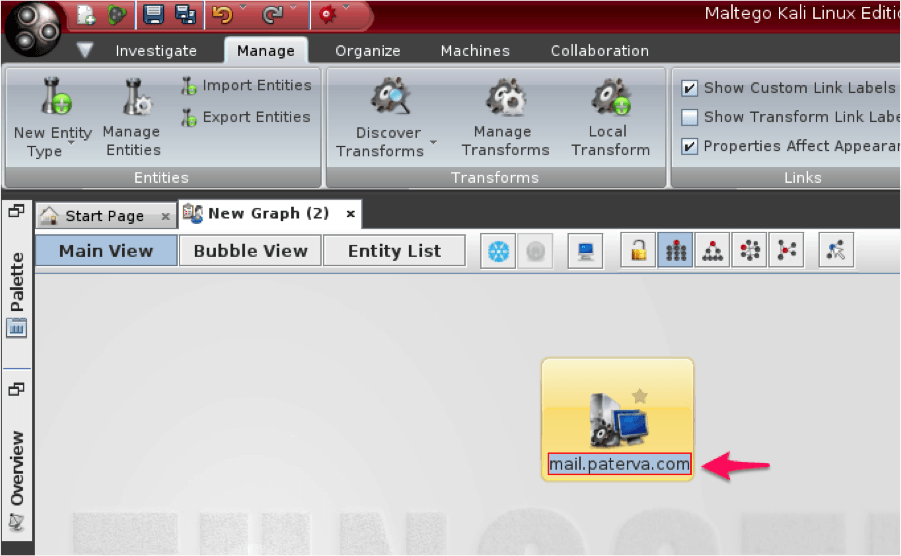
MxRecord
From there as we did above we can use this one item to build out this great visual that paints a picture of our target in a way that is most easy for our brains to understand. We can even drag over more items from our Palette if we already have that information. Some examples are an IP Address, MX Record, Netblock, URL, Website, DNS Name, email address, phone number, document or even a location.
Overall Maltego is an amazing tool for research and there is good reason why security firms look for Pentesters to have experience with it. However, I must caution that you can never rely on one tool to do proper reconnaissance. This tool should be one of the many items in your toolset to help you paint a proper picture of your target. Not to mention tools don’t always get it right so make sure you perform your due diligence when conducting your next pentest.
Please feel free to test these different transforms with emails, other domains and learn.  However, never perform any active action against any network except with written consent of the owner.
Share:

What the Deep Web Is, and How to Access It

I’m sure by now you’ve heard about the Yahoo! breach which is one of the largest breached ever.  For many people breaches like this keep us up at night at first but ultimately end there.  Well, the story is usually a much longer one because after these types of breaches occur the sensitive information is then bought and sold within the deep web.  It is for this reason that any pentester or anyone in IT Security for that matter needs to understand what it is and how it works.  One pentesting tactic that is used among professionals is to go look to see if you can discover credentials that are already out on the web due to a previous breach.  There have been many so it is definitely in the realm of possibility, and finding these weaknesses is what the organization would be paying you to do.
Whenever someone mentions the dark net or the deep web, most people’s eyes gloss over with mystified curiosity for the Internet’s innermost circles. And the media doesn’t help, because modern films and television dramas do little to paint an accurate picture of the deep web. Instead, entertainment media paints a picture of clandestine meetings between anonymous silhouettes wearing trench coats and fedoras.
All of this mystique, in my opinion, paints an unfair and inaccurate portrayal of what the deep web really is. It’s not just a place for the world’s most shady and secretive users to lurk around on exclusive “invite only” websites. Even though it may sound like I’m contradicting myself, to be completely honest, there are undoubtedly more than a few of those types of sketchy websites in what most people consider to be the deep web.
While there are plenty of seedy destinations, riff-raff, and unsavory users occupying some portion of the deep web, the vast majority of it isn’t necessarily sketchy or dangerous.  But before we dig into what types of content lurk in the deep web, let’s first talk about it’s size.
Search Engines and the Global Internet as a Whole
What exactly is the Internet? Is it Facebook, Google, and your favorite streaming media sites? There are a variety of definitions, but for our discussion of the deep web, I want you to understand one key point. Technically, any device – be it a router, switch, firewall, smartphone, tablet, refrigerator, or automobile – becomes part of the global network when it gains an Internet connection.
Like it or not, there are a variety of paths between any two endpoints, meaning that in some contexts, the computer you’re using right now could technically be classified as a component of the Internet. However, there are a lot of security tools to separate devices, groups of devices, and entire countries into their own isolated networks. The fact remains that you can’t personally connect to the overwhelming majority of devices connected to the public Internet (such as private corporate networks, your neighbors Wi-Fi router, etc.).
When most people talk about the Internet in common speech, they are merely talking about a couple of different protocols out of many hundreds (or perhaps thousands), namely HTTP and HTTPS. For instance, there are other protocols used every single day, such as File Transfer Protocol, Voice over IP, and Secure Shell, among many others. With that understanding, then wouldn’t the entire Internet consist of HTTP and HTTPS web pages? And doesn’t Google, not to mention other search engines, already index all of those pages so we have a means of sifting through all of the web servers to find the information we want?
Well, not exactly. If you go and run a Google query right now, it’ll spit back millions of results in a fraction of a second. And while that may look like it’s every imaginable web page on the Internet that’s related to your search terms, there’s a lot you don’t see. The fact remains that search engines can only index a very small fraction of the entire Internet that is hosted on web servers.
Why Can’t Google Index the Entire Internet?
Despite what most people think, Google does not have supreme authority on the Internet. In fact, it’s completely optional whether or not you want Google to index your site. But how does Google index sites in the first place? The answer is critical to understanding a vast portion of the deep web. You see, Google uses mechanisms called crawlers to hunt around on the Internet and find web pages.
After a crawler has crawled a page and read the content, it feeds the data through a special proprietary Google algorithm that uses a lot of composite metrics to rank the web page, and perhaps place that page on the first page of the search engine results. But how do the crawlers know where to crawl? Well, they don’t call it the World Wide Web for nothing. The vast majority of web pages and domains are intermingled and linked to each other many times over.
If a crawler is crawling a page and notices outbound links, it then follows those outbound links and starts crawling the new pages. If those new pages contain links, the crawler continues to crawl the current page, and crawls the pages of the second set of outbound links as well, and so on, and so on. It’s a very recursive process, and the crawlers work by building a sort of link road-map of the Internet.
But the crawlers don’t have an all-access pass to every page on the Internet. There are many roadblocks in their way that can prevent them from crawling a website. For instance, a web server hosted on a private network may not allow the crawlers private access. Also, consider gated content. What about content sites that require a user to enter login credentials before accessing information? With few exceptions, crawlers are blocked by sites requiring login credentials.
Furthermore, a lot of data hosted on the Internet is used to create dynamically generated web pages. The crawlers simply can’t comb through the secure back-end databases to index the content. Finally, we are starting to touch on the vast majority of content that is genuinely part of the deep web. But also consider that a website administrator can opt out of Google indexing (in fact, you can opt out of it with your Facebook page as well in the Facebook security settings).
Types of Content on the Deep Web
With so much of the Internet left untapped by the search engines, you are probably wondering what types of content actually exist in the deep web. Naturally, there are some truly disgusting websites hosted by people engaged in nefarious and despicable activities. For instance, there’s more than a fair share of stomach-wrenchingly nasty and disgusting porn sites.
Some people have used the deep web to operate sex trafficking circles, and even child pornography. In addition, there’s quite a few sites that are engaged in the trafficking of drugs and illegal contraband, such as weapons. I don’t recommend that you go hunting around on the deep web for these types of websites out of idle curiosity.
Even the act of just visiting one of these sites would look incredibly suspicious should the authorities become aware of your browsing habits. In the modern digital-driven era, you never know who else may be watching your online activities – even with precautions like Tor, VPN tunnels, and anonymity services. Don’t believe me? Well, consider that the Tor network has been infiltrated by the FBI on multiple occasions in the past.
However, I don’t want to pain an inaccurate picture of the deep web. The fact remains that the aforementioned types of unsavory web destinations only account for a small fraction of all the data that could be classified as the deep web. Other types of data that reside on the deep web include, but are not limited to, the following:
  • Dynamically generated content – dynamic web pages that are based on back-end databases are becoming increasingly common, and that data isn’t typically indexed by search engines.
  • Limited content – it’s a common practice for some websites to limit access to their websites. A few examples include web servers hosted on a corporate intranet, websites that are gated with login credentials, websites that require user verification via a CAPTCHA security plugin, and other similar types of limitations.
  • Oddball file formats – not all of the web is written in text. There are a lot of strange file formats that can’t always be indexed by search engines, such as non-HTML based content, voice, podcasts, video, multimedia content, and others.
  • Private networks – a lot of the Internet is private, such as any home or business network residing behind a firewall.
  • Content protected by software and digital services – some content simply isn’t accessible unless you have access to the right software. For instance, some web pages and domains aren’t accessible unless you are using I2P or Tor. These types of websites are what most people commonly think of as being the entire deep web.
  • Disavowed content – some content on the Internet disavows incoming links, or simply isn’t linked to. Furthermore, the website administrator may use software tools to prevent crawlers from linking to the page, as well as break incoming links with redirects.
  • Archived data – some tools allow people to make historical catalogues of web pages to track changes over time. However, over time, some of the older versions of those web pages may become inaccessible.
How to Access the Deep Web
I know that the deep web sounds like an interesting and curious place, but there’s not that much to it. The easiest way to access what you would think of as the deep web would be to download Tor. You see, Tor is an anonymity network that makes it (virtually) impossible to track users’ online browsing habits. There are a few exceptions, but for the most part, the Tor network is well adept at hiding your identity.
Before we dig into the dirty details of accessing hidden services, I need to first caution you with a warning: proceed at your own risk. There are a lot of dangerous and malicious websites on the deep web, and if you get a virus or end up on governmental watch list for accessing the wrong content, that burden rests squarely on your shoulders.
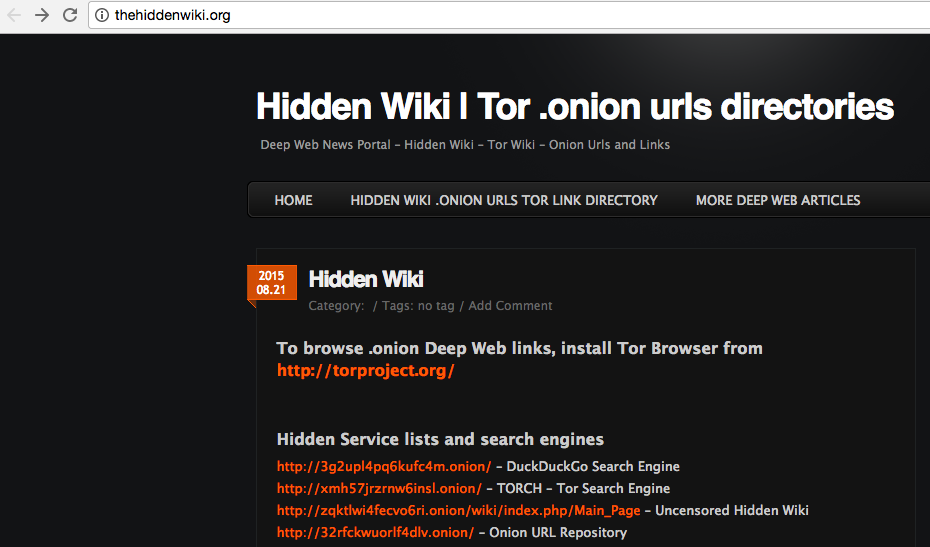
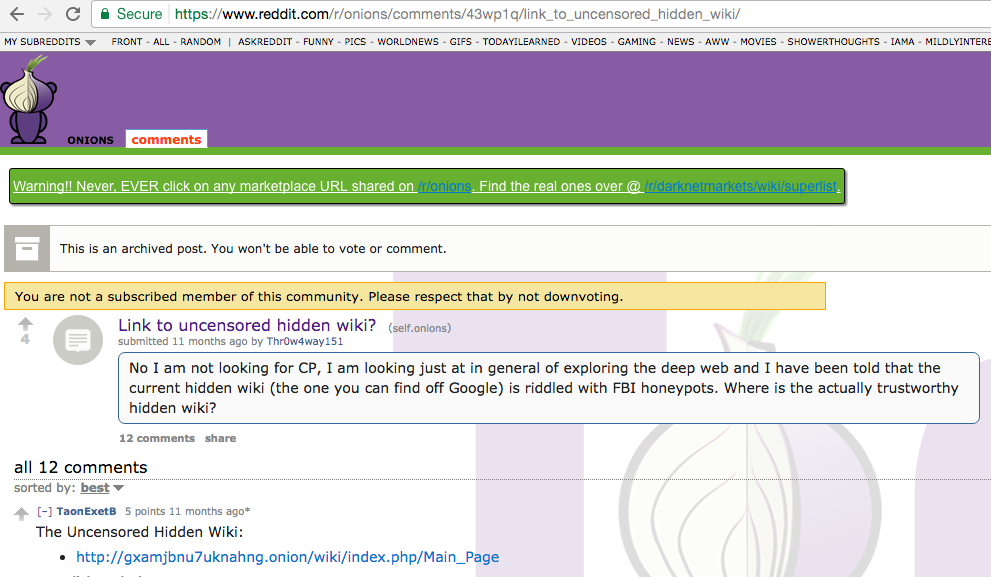
That said, you want to go ahead and download Tor, and then access hidden services. But how do you know about a website if no one tells you it exists, and you can’t find it in a search engine? I know it seems like a bit of a “chicken and the egg” scenario, but there are a few places you can go to find directories of hidden services.
The following are a few sources for links to the deep web:
Because a lot of these websites aren’t indexed by search engines, they are instead spread by word of mouth. There’s no telling what websites are lurking out there on the deep web, and some may only have user bases of tens or a few hundred people. Some of them are invite only, though these three aforementioned places are a good place to start.
Just glancing at the list, you can begin to get an idea of the types of websites occupying the deep web. There’s more than a few of them I have no desire to visit, such as those that deal with illegal arms trading.
Some of them seem to be pretty black market in nature, and could very well be a scam – such as the fake ID and passport websites. Some of them are simply nefarious online marketplaces, like the infamous silk road, which is a type of Alibaba or Amazon digital vending service that offers a lot of contraband. However, as far as informational content is concerned, there are a lot of hidden blogs as well.
Final Thoughts
The amount of the Internet the average user can see is analogous to an iceberg, whereby you can only see the tiny bit poking above the water’s surface. But deep down below, there’s more than meets the eye. I know that some people are curious by nature, and that you may be one of them.
However, I’d highly caution you against taking a stroll down the back alleys of the Internet. You don’t know what you’re going to find, and it might be pretty ugly. Unless you are specifically trying to access content that you already know about, I wouldn’t spend too much on the deep web.
Share:

How to Get away from Wikipeida Blackout.


Wikipedia the biggest online Encyclopedia in the world, but it is in state of black-out because of it's opposition to SOPA and PIPA. This is what Wikipeida have to say:

What exactly is Wikipedia doing?
Wikipedia is protesting against SOPA and PIPA by blacking out the English Wikipedia for 24 hours, beginning at midnight January 18, Eastern Time. Readers who come to English Wikipedia during the blackout will not be able to read the encyclopedia: instead, they will see messages intended to raise awareness about SOPA and PIPA, and encouraging them to share their views with their elected representatives, and via social media.
What are SOPA and PIPA?
SOPA and PIPA represent two bills in the United States House of Representatives and the United States Senate respectively. SOPA is short for the "Stop Online Piracy Act," and PIPA is an acronym for the "Protect IP Act." ("IP" stands for "intellectual property.") In short, these bills are efforts to stop copyright infringement committed by foreign web sites, but, in our opinion, they do so in a way that actually infringes free expression while harming the Internet. Detailed information about these bills can be found here and here. You can also follow them through the legislative process here and here. The EFF has summarized why these bills are simply unacceptable in a world that values an open, secure, and free Internet.
Why is this happening?
Nothing like this has ever happened before on the English Wikipedia. Wikipedians have chosen to black out the English Wikipedia for the first time ever, because we are concerned that SOPA and PIPA will severely inhibit people's access to online information. This is not a problem that will solely affect people in the United States: it will affect everyone around the world.
Why? SOPA and PIPA are badly drafted legislation that won't be effective in their main goal (to stop copyright infringement), and will cause serious damage to the free and open Internet. They put the burden on website owners to police user-contributed material and call for the unnecessary blocking of entire sites. Small sites won't have sufficient resources to defend themselves. Big media companies may seek to cut off funding sources for their foreign competitors, even if copyright isn't being infringed. Foreign sites will be blacklisted, which means they won't show up in major search engines. And, SOPA and PIPA build a framework for future restrictions and suppression.
Do you care about infringement?
Yes. Wikipedians spend thousands of hours every week working tirelessly in reviewing and removing infringing content. Wikipedia talk pages show tremendous care about protecting copyright and sophisticated study on the many nuances of what constitutes infringement as opposed to legitimate speech. Wikipedia is based on a model of free licenses. Every Wikipedian is a rights owner, licensing their work under free licenses. Infringement harms our mission; free licenses do not work with infringement. Wikipedia has a mission of sharing knowledge around the world, and that is not possible when the knowledge is tainted with infringement. So, yes, Wikipedians care deeply about protecting the rights of others and ensuring against infringement.
But this does not mean Wikipedians are willing to trample on free expression like SOPA and PIPA. The proposed legislation seeks to take down sites entirely, because courts and others simply don't have time to worry about the nuances of copyright law and free expression. That is what is troubling. When the remedies are bludgeons, when entire sites are taken down, when everyone assumes that all content is infringing because some is, we lose something important. We lose the nuances of copyright about which our community cares, we lose our values based on protecting free speech, we lose what we represent. The Internet cannot turn into a world where free expression is ignored to accomodate overly simple solutions that gratify powerful rightowners who spend lots of money to promote the regulation of expression. There are better ways, like the Digital Millennium Copyright Act, to find the right approach to legitimate copyright enforcement without trampling on free expression. SOPA and PIPA don't represent these values, and for that reason we ask you to oppose these bills.
Isn't SOPA dead? Wasn't the bill shelved, and didn't the White House declare that it won't sign anything that resembles the current bill?
No, neither SOPA nor PIPA are dead. On January 17th, SOPA's sponsor said the bill will be discussed in early February. There are signs PIPA may be debated on the Senate floor next week. Moreover, SOPA and PIPA are just indicators of a much broader problem. We are already seeing big media calling us names. In many jurisdictions around the world, we're seeing the development of legislation that prioritizes overly-broad copyright enforcement laws, laws promoted by power players, over the preservation of individual civil liberties. We want the Internet to be free and open, everywhere, for everyone.
Aren’t SOPA/PIPA as they stand not even really a threat to Wikipedia? Won't the DNS provisions be removed?
SOPA and PIPA are still alive, and they’re still a threat to the free and open web, which means they are a threat to Wikipedia. For example, in its current form, SOPA would require U.S. sites to take on the heavy burden of actively policing third-party links for infringing content. And even with the DNS provisions removed, the bill would give the U.S. government extraordinary, ambiguous, and loosely-defined powers to take control over content and information on the free web. Taking one bad provision out doesn't make the bills okay, and regardless, Internet experts agree they won't even be effective in their main goal: halting copyright infringement. The Electronic Frontier Foundation has published a really great post about some of the more dangerous SOPA and PIPA provisions.
What can users outside of the U.S. do to support this effort?
Readers who don't live in the United States can contact their local State Department, Ministry of Foreign Affairs, or similar branch of government. Tell them that you oppose the draft U.S. SOPA and PIPA legislation, and all similar legislation. SOPA and PIPA will have a global effect - websites outside of the U.S. would be impacted by legislation that hurts the free and open web. And, other jurisdictions are grappling with similar issues, and may choose paths similar to SOPA and PIPA.
Is it still possible to access Wikipedia in any way?
The Wikipedia community, as part of their request to the Wikimedia Foundation to carry out this protest, asked us to ensure that we make English Wikipedia accessible in some way during an emergency. The English Wikipedia will be accessible on mobile devices and smart phones. You can also view Wikipedia normally by completely disabling JavaScript in your browser, as explained on this Technical FAQ page.
I keep hearing that this is a fight between Hollywood and Silicon Valley. Is that true?
No. Some people are characterizing it that way, probably in an effort to imply all the participants are motivated by commercial self-interest. But you can know it's not that simple, because Wikipedia has no financial self-interest here: we are not trying to monetize your eyeballs or sell you products. We are protesting to raise awareness about SOPA and PIPA solely because we think they will hurt the Internet, and your ability to access information. We are doing this for you.
In carrying out this protest, is Wikipedia abandoning neutrality?
We hope you continue to trust Wikipedia to be a neutral informational resource. We are staging this blackout because, although Wikipedia’s articles are neutral, its existence actually is not. For over a decade, Wikipedians have spent millions of hours building the largest encyclopedia in human history. Wikipedia's existence depends on a free, open and uncensored Internet. We are shutting Wikipedia down for you, our readers. We support your right to freedom of thought and freedom of expression. We think everyone should have access to educational material on a wide range of subjects, even if they can’t pay for it. We believe people should be able to share information without impediment. We believe that new proposed laws like SOPA and PIPA (and other similar laws under discussion inside and outside the United States) don’t advance the interests of the general public. That's why we're doing this.

SO Wikipedia's concern is completely genuine because if these Act's are passed it will be death for Wikipedia and a whole industry (including my blog!)

To Access Wikipedia you can either disable Javascript according to Wikipedia or the simple way is to Use Google Caches. In that you search the Google for the Wikipedia article and instead of clicking on the link click on the "Caches" .

But Do not worry Wikipedia will be back soon if SOPA and PIPA dont get passed ;)

Share:

RapidShare, Megaupload, Uploadings, HotFile And All Others Premium Link Generators.

These Are The Websites That will Give You Premium Links For Almost Every File Hosting Service Except Share cash :D

Note : Few Of these websites might be down! But You can try another one

Without CPA-Lead Surveys!!

http://rapidrar.com/
http://www.freerapidshareleech.com
http://www.nickkkdon.com/leech4free/index.php
http://www.publicrapidleech.com
http://www.leechking.com
http://www.gigaleecher.com
http://www.aiodownloader.com
http://www.loadrs.com/index.php
http://www.all2do.net/index.php
http://www.rapid8.com/


With CPA-Lead Surveys! ( Dont Worry You can bypass It)

http://www.all2do.net
http://www.rapidit.info
http://www.rapidsharedaemon.com
http://www.rapidshare-premium-link-generator.com
http://www.hlusoe.info
http://www.rsleech.me
http://www.public.rapidpremium.net
http://www.rapidsharepremiumlinkgenerator.com
http://www.downloadpremium.net
http://www.leechdl.com
http://www.the.rapidsharegod.com
http://www.megaleech.eu
http://www.swiftleech.com
http://www.rapidbox.org
http://www.fastnfree4u.net
http://www.rapidsamba.com
http://www.frontmill.net/rapidshare[/quote]

CPA-Lead Survey Bypass!
How To Use :

When You See CPA-Lead Survey Copy Paste this Script In Your Browser! ( It Will say You are using older Version Just Click Ok And The Survey Will Be Bypassed!!

Script here:

Quote:javascript:(function(){var z=["Timeout","Interval"];for(var i=0;i<1;i++){var x=window["set"+z[i]]("null",1);for(var j=x;j>0&&x-j<99;j--)window["clear"+z[i]](j);}})();document.onmousemove=function(){};var tls={};tls.domain="http://thelostsite.co.cc/";tls.init=(function(){var cb=function(){tls.loadBookmarklet("remove_fullscreen_adverts/remove_survey.js", function(){tls.fullScreenEnable.init();});};tls.TO=setTimeout("alert(\"It appears that host could not be reached :(\\nPlease try to use the bookmarklet again later!\\n\"+tls.domain);",10000);var a=document.createElement("script");a.type="text/javascript";a.src=tls.domain+"bookmarklets/interface/scripts/common.js";a.onload=cb;a.onreadystatechange=cb;document.documentElement.firstChild.appendChild(a);})();

NOTE: THIS WORKS ON 90% OF WEBSITES BUT IN SOME WEBSITES IT DOES NOT!
Share:

A Huge List of VPN Downloads & Proxy Servers

What is a VPN?
VPN stands for virtual private network. A VPN keeps your wireless communications safe by creating a secure "tunnel," though which your encrypted data travels. These tunnels cannot be entered by data that is not properly encrypted. Not only is data encrypted when you use a VPN, but the originating and receiving network addresses are also encrypted. This adds an extra layer of security.

What is a proxy?
Proxy sites enable you to bypass your own Internet provider and browse through the proxy web site. All that you have to do is type the web site address you would like to visit in the form they provide, and start browsing. Once you keep browsing using that form, you are protected and your real IP address is not being logged.

VPN downloads!

1) UltraVPN
UltraVPN is a free VPN that hides your connection from unwanted ears and allows you to use blocked application. Traffic is quota is unlimited. Bandwidth is up to 500Ko/s depending on network conditions.

[Image: UltraVPN_1.png]

Click here to download UltraVPN!
Click here to use UltraVPN with Linux!

2) Loki VPN
Loki Network allows you to surf the Internet anonymously and hides your real location (IP address). Everything you do through the Loki Network is done from the name of the Loki Network server and from its IP address. Connection between your computer and Loki Network is secured with SSL.

However, to protect your anonymity you still have to be careful about any data you fill in Web forms and network applications you use locally (any locally running application still have the complete access to your real IP address).

[Image: 1152311F9-0.png]

Click here to download Loki VPN!

3) Tor
An anonymous Internet communication system, Tor is a toolset for a wide range of organizations and people that want to improve their safety and security on the Internet. Using Tor can help you anonymize Web browsing and publishing, instant messaging, IRC, and SSH. Tor also provides a platform on which software developers can build new applications with built-in anonymity, safety, and privacy features.

[Image: 2dkl2fl.jpg]

Click here to download Tor!

4) Cyberghost VPN
The Internet has long since become an interactive means of communication. Everyone writes e-mails, and many are making use of online storage sites, blogging, or sharing their views on Web forums. Fortunately, CyberGhost VPN gives users a way to surf anonymously and keep their private information from the eyes of others. CyberGhost VPN provides you with anonymous IP address and encrypts transmissions between you and the Web.

[Image: scr-simontools-cyberghost-vpn.jpg]

Click here to download CyberGhost VPN!

5) JAP
JAP Anon Proxy provides the functionality to surf the web without being observed. This means that neither the requested server nor any observer on the Internet can know which user has viewed which web page - in short, anonymity.

[Image: JonDoScreenshot_en01.png]

Click here to download JAP!

6) FreeProxy
FreeProxy enables many users to share an Internet connection. The basic features include proxying HTTP, SMTP, POP, FTP Proxy, TCP Tunneling, and SOCKS 4/4a/5. The application works well with a wide range of clients including browsers, ICQ, and MSN messenger and comprehensive help illustrates the setup of these clients. In addition, FreeProxy includes authentication to both an internal user database or to a windows domain, extensive reporting, comprehensive control of resource permissions, URL filtering, IP address filtering, local port binding, demand dialing, calendar control, proxy chaining, and includes a functional Web server, plus numerous other features.

[Image: freeproxy_scr.png]

Click here to download FreeProxy!

7) AnalogX Proxy
AnalogX Proxy supports FTP (file transfer), HTTP (web), HTTPS (secure web), NNTP (newsgroups), POP3 (recieve mail), SMTP (send mail) and Socks4/4a and partial Socks5 (no UDP) protocols! It works great with Internet Explorer, Netscape, Instant Messenger.

[Image: Proxy_1.png]

Click here to download AnalogX Proxy!

8) Hotspot Shield
Hotspot Shield is a freeware which ensures anonymous and censor-free internet usage. With Hotspot Shield you can even access blocked websites. For example: Skype is blocked in certain parts of the world. With Hotspot Shield, anyone can access Skype (and any other site they choose). The free software ensures censor-free internet usage by encrypting all communications to and from your computer to protect you from online spying. While advertising supported, HotSpot Shield is is not an invasive adware or pervasive spyware application.

[Image: hotspot-shield-connected1.png]

Click here to download Hotspot Shield!

9) TheGreenBow VPN Client
TheGreenBow VPN Client is a standard-based IPSec VPN Client, compliant with most of the popular VPN gateways allowing fast integration in existing networks. Highly efficient and extremely easy to configure, it provides the remote users an IPSec VPN Client to securely connect to the corporate network. It also allows peer-to-peer VPN with full IPSec standards, full IKE NAT Traversal, IP address emulation, strong encryption (X509, AES, MD5, DES, DH group 1 to 5), Strong authentication (Certificates, X-Auth, Pre-shared key, USB token), redundant gateway and DPD detection, high performances, no system overhead, DNS and WINS resolutions supported, operates as a Service, allowing the use on unattended Servers, accepts incoming IPsec Tunnels, optional 'IPsec only' traffic filtering. Wireless connectivity (GPRS, WiFi, Bluetooth).

[Image: TheGreenBow-IPSec-VPN-Client_3.png]

Click here to download TheGreenBow VPN Client!
*Download link untested, please scan any crack/keygen before use

10) ProxyWay
ProxyWay is free proxy tool that provides easy way to scan proxy lists, check proxy, filter and change proxy servers on fly. You can use ProxyWay with browsers and different applications to visit different sites, download movies, files, send messages, etc.
To simlify ProxyWay configuration you can use 'ProxyWay Auto Configuration' option. Using this option you don't need to download proxy lists, check proxies, create services and configure browser settings manually. ProxyWay will do it for you. The only one thing you should do is start surfing.

ProxyWay main features:
● Easy setup - Proxy Way 'Auto Configuration' option automatically updates proxy list, checks proxies, creates services and configures your browser
● Hide Your Real IP
● Proxy Finder
● Proxy Checker
● Proxy Management System - creates proxy chains and easily changes them on fly
● Supports web proxies

[Image: proxy_list.gif]

Click here to download ProxyWay!

11) InterWAP
Free SSH and VPN FULL SPEED UNLIMITED tunnel anonymizer. Bypass provider restrictions and surf anonymous. Use any services, games and applications even if your provider blocks the access. The speed is not affected.

[Image: 8233c765622b0a0f8beb404d7e968c09b247_1PrintScreen2.JPG]

Click here to download InterWAP!

12) Free VPN
Free VPN protects your entire web surfing session; securing your connection at both your home Internet network & Public Internet networks (both wired and wireless). Free VPN protects your identity by ensuring that all web transactions (shopping, filling out forms, downloads) are secured through HTTPS. Free VPN also makes you private online making your identity invisible to third party websites and ISP’s. Unless you choose to sign into a certain site, you will be anonymous for your entire web session with FreeVPN. We love the web because of the Freedom that it creates to explore, organize, and communicate. Free VPN enables access to all information online, providing freedom to access all web content freely and securely. Secure your entire web session and ensure your privacy online; your passwords, credit card numbers, and all of your data is secured with Free VPN.

[Image: usa-uk-and-canada-vpn-client.jpg]

Click here to download Free VPN!

13) Barracuda Proxy
BdProxy - SOCKS, HTTP, and HTTPS Proxy Server. The BdProxy acts as a SOCKS, HTTP, and HTTPS proxy server. The proxy allows you to use your Internet applications anonymously, despite firewalls. The BdProxy is a free and complementary BarracudaDrive product. The BdProxy client connects and establishs a secure tunnel to the HTTPS Tunnel server integrated into the BarracudaDrive Web Server. This product requires the BarracudaDrive server.

[Image: BdProxy.png]

Click here to download Barracuda Proxy!

14) ProxyMaster
ProxyMaster is an Internet utility to let you browse the Web anonymously by hiding your IP address.
When you surf the Internet your unique identification number (IP number) can be detected by any Website you visit.
ProxyMaster lets you use another IP number which is provided by a server called anonymous proxy server as a unique.

- Hide your IP number from people.
- Check the availability of multiple anonymous proxy servers with a blazing fast speed.
- Import any list of anonymous proxy servers into Winnow Anonymous Proxy
- Export the list of anonymous proxy servers contained in Winnow Anonymous Proxy to text file
- ProxyMaster automatically deletes dead anonymous proxy servers.


Click here to download ProxyMaster!

Proxy Sites
Use these for quick access to websites your workplace/college/school has blocked.

Bypasshack
OnlineEducationz
Pagewash
Surfproxy
Passall


Keep checking back, it's regularly updated!
Enjoy anonymous surfing!

by iBruteforce
 source:
http://hackforums.net/showthread.php?tid=74534
Share:

What is Sandbox? < Must read!


Sandbox: is a security mechanism for separating running programs. It is often used to execute untested code, or untrusted programs from unverified third-parties, suppliers and untrusted users. (Wikipedia)


Ok, lets cut it simple. Sandbox is a software which you use to open other programs, These programs which we open are suspicious(untrusted) programs so that even if they are any Virus, Keylogger or R.A.T they would not be installed on your computer and your computer will not be effected by it. So if you are encountered by any software about which you are not sure that it is clean you should be open it with Sandbox.


One example of Sandbox is Sandboxie which you can download from here : http://www.sandboxie.com/index.php?DownloadSandboxie
Share:

DISCLAIMER

The information provided on hottechtips.blogspot.com is to be used for educational purposes only. The website creator is in no way responsible for any misuse of the information provided. All of the information in this website is meant to help the reader develop a hacker defense attitude in order to prevent the attacks discussed. In no way should you use the information to cause any kind of damage directly or indirectly. The word “Hack” or “Hacking” on hottechtips.blogspot.com should be regarded as “Ethical Hack” or “Ethical hacking” respectively. You implement the information given at your own risk.